|
| |

|
|
|
 |
|
Supported Automation Systems |
Supported RDS Encoders |
|
AudioVault
Dalet
Genesys
Google Automation (WO)
iMediaTouch
Jazler
Neilson BDS (Web)
Maestro
NextGen
Radiomation
RCS
Scott Studios
Smarts
Simian
Zara |
Inovonics
711
712
713
720
730 (RT+)
Audemat
FMB80 (RT+)
FMB10
Silver
Axel Technology
Tiger Shark (RT+)
Other
RDI 20
T-Fleet
Sirius Canada
|
|
Satellite |
ABC
Best Country
Delilah
Dial Global
Jack-FM
Hot AC
True Oldies
|
|
|
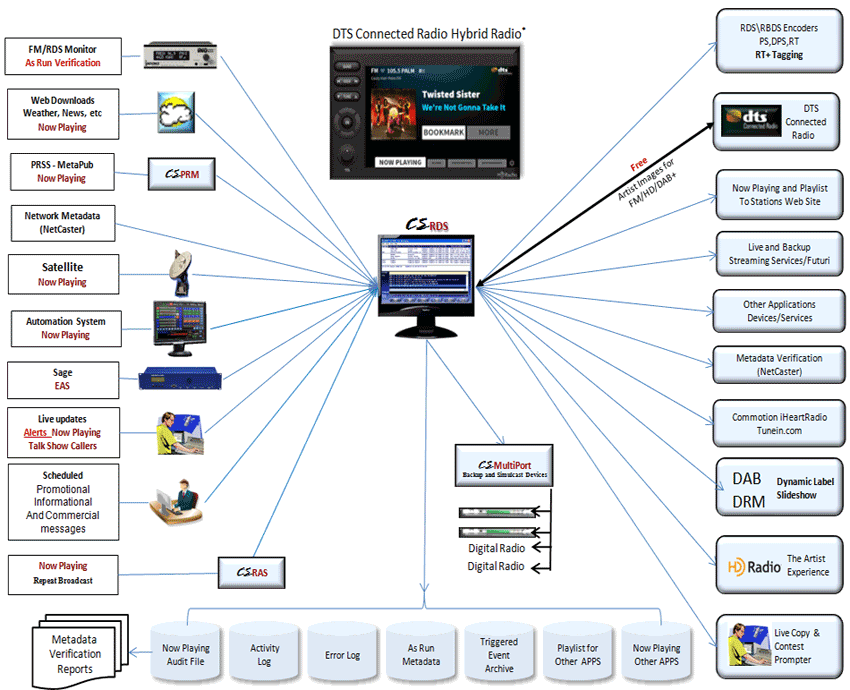
The major modules used for
the "RDS" processes are:
CSScheduler
is used to
schedule promotional messages by station, date, day-of-week, time-of-day OR to
"Trigger" a message based on what is playing in the automation system.
CSWeather
will
capture information from Web sites. Local weather forecast and alerts can be
downloaded from the National Weather Service in the US and
local weather forecast from Environment Canada in Canada. We can also capture now
playing information from your BDS Neilson data on your web site when not using
the automation system and if desired this module can also be customized to
download information from specific subscription sites for sports updates,
traffic, etc.
(A one time customization fee will
be charged based on the site and complexity of the data to be captured)
|
|
CSRDS is the actual
metadata handling module. This program captures and merges data from a
variety of input sources and sends it to any combination of RDS Encoders, Web
Sites, HD Radio systems, On-line streams, or for use in other applications. Music and "Triggered" events
will be sent to all configured outputs but
promotional messages, weather forecast, etc may be blocked from any one or more
outputs. |
|

Depending on your RDS/RBDS encoder,
there are three types of messages sent to the RDS enabled device (FM
Receiver, Cell Phones, MP3 Players, etc) These are PS, RT and DPS.
In addition to the text messages, the RDS\RBDS encoder also sends the
Program Identifier (PI) that identifies your station and Program Type
(PT) which identifies the station's format and for RT+ enabled
devices an RT+ code to identify the song and artist allowing the
listener to purchase and download the song. |
|
PS
Program Service Name: The station’s
“street name” that will appear on the receiver faceplate display.
The PS can be up to eight characters in length (including spaces)
and can be as simple as the station’s call letters (“KNAB” or “KNAB
FM”) or a slogan (“THE HAWK” or “FM96”). The Program Service Name
is automatically displayed on all RDS enabled devices.
|
|
RT
This is the Radio Text which is a
64-character "scrolling" message containing the artist and title
information, promotional message, weather forecast, etc. This
message is also sent to RDS enabled devices but may require the
listener to press an "Info" button to see this message and some RDS
receivers DO NOT display Radio Text.
|
|
DPS
Due to the limitations of some
receivers to display Radio Text, several RDS/RBDS encoders have a
Dynamic Program Service or DPS option. When used, the 64-character
message is broken into
8 character segments and will automatically display in the PS area
of the RDS enabled device. Check your RDS Encoder manual for
restrictions and details.
|
|
RT+
The RT+ code is a special code sent
via the RDS\RBDS encoder to RT+ enabled devices such as Microsoft's
Zune MP3 Player allowing the listener to purchase and download the
current song. This can be done immediately if the device is connected to the
internet via a wireless link or at any time for RT+ enabled devices
such as cell phones. When connected, the album art can be displayed
and if desired, the listener may preview a few seconds of the song
or purchase and download the song to the device. If not connected,
the "tag" is saved and the option is available when the RT+ device
is connected.
|
|
PI
The Program Identifier or PI is a hex
code included in the RDS signal that identifies the station and
becomes the “digital signature” of the station. In
the US this is identified by a formula based on the station's call
letters. For Example, station KNAB would have a PI of 3255. For
Canadian stations, Industry Canada has posted a spreadsheet created
by the CBC to calculate Canadian PI codes on their web site at
http://www.ic.gc.ca/eic/site/smt-gst.nsf/eng/h_sf08741.html.
|
|
PTY
The PTY or Program Type is a
pre-defined code and is a number between 01 and 31.Many RDS
receivers are able to seek the listener’s preferred format
automatically. This means that a car radio can switch from a fading
station to a stronger one that carries the same variety of music.
The PTY function of RDS helps a broadcaster catch ‘transient
audience’ share. CSRDS provides the ability to schedule different
PTY settings for different Days, Day of Week and Time of Day.
|
|

Data to HD Radio systems is sent via
drivers used under license from iBiquity Corporation. Since
different versions of HD software are being used for different
stations you may select the version necessary for your system.
This is selectable within the configuration of each instance and may
be mixed. For example, we may need the original MPSPAD version for
your Main Channel, PSD HDR V1 for a different channel and PSDGEN
V4.5 for another channel. Simply select the version you need.
|
|

All of the same metadata sent to the
RDS or HD system can be sent to your Streaming player. Streaming
data can be sent via TCP/IP,
UDP, HTTP, HTTPS, with HTTP authentication. Since each
streaming company captures data in different formats, CSRDS formats
the data using a user definable template. A template is a text file in the format
required by the streaming site with "merge codes" defining where the
information is to be added. Templates for Stream The World and
Ando
are included in the Center Stage Live Installation set. More
information on Templates is available on our
Templates Page and the Template Programmers
Guide may be downloaded from our
Download Page.
|
|

CSRDS will also send both now playing
and a playlist history to your web site via an FTP upload. Like the
stream, this data is formatted with a user
definable template. Normally an XML file but it can be any format required by
your web developer. Sample Templates Now Playing and the Playlist
history are included in the Center Stage Live installation set. More information on Templates is available on
our Templates Page
and the Template Programmers Guide may be downloaded from our
Download Page.
|
|

If desired, CSRDS will create a text
file on your local computer or network that can be used for other
applications. This will be formatted as defined for now playing and
playlist history for the web site or as a pure text file. We may
also create a text file in the same format as required for the
stream. This data can then be used for other applications such as
digital signs or simply to verify the information sent to the Web
and Stream.
|
 |
-
Support for most of the major
Automation Systems
-
Support for the most popular RDS
encoders
-
Schedule promotional/sponsor message by Station,
Date, Day of Week and Time of Day
-
Schedule promotional/sponsor messages for a
specific time of day
-
Schedule “Triggered” promotional/sponsor messages based on an event in
the on-air system.
-
Day Part triggered promotional or sponsor
messages for time appropriate messages
-
RT+ support for the Inovonics 730 and FMB80 allowing listeners to preview, purchase and download songs
on RT+ enabled devices such as Microsoft's Zune and Apple's IPOD media players.
-
Station Branding showing station ID when lost
in Dynamic PS
-
User definable formats “PAINT IT BLACK BY THE ROLLING STONES
ON KNAB-FM” or
“The Rolling Stones With Paint It Black on KNAB-FM”, etc.
-
User definable “templates” for Web
Designers, Streaming systems or any other application as desired. Simply add
our merge codes to a text file and CSRDS will format the information as required.
-
Input from automation system via IP (TCP/IP or UDP), Serial
port or a Disk File.
-
Output to Encoders via IP (TCP/IP or UDP) or
Serial Port
-
Output to Web via FTP formatted in Now
Playing and Play List template
-
Output to stream via IP (TCP/IP, UDP, HTTP, HTTPS,
URL) based on Merge template
-
Output to internal disk file formatted in Now
Playing and Play List Template
-
PTY Scheduling by station, day of week and
time of day. E.g. Country during the week, Religious on Sunday mornings.
-
Encoder command line for direct communication
with the encoder
-
On-Line Help and PDF user Manuals included
-
Reliable, accurate and so much more.
|
 |
-
Send data to any combination of
output devices...RDS/RBDS encoder is NOT required
-
Capture and store now playing
information for 90 days
-
"Promo between Songs" and "End Cart" messages
options to
remove old songs from Web Site and Stream
-
Automatically add local weather to the
display via CSWeather
-
Capture now playing from Nielson
BDS feed on your web site for
non-automation periods
-
Web based templates ensuring all
stations use the same format
-
Import text from other applications (News
systems, word processing software, etc)
-
Templates included for Now
Playing, Play List, Stream The World(2) and ANDO
-
"Port Aware" processing allowing multiple
automation systems to feed the same outputs. E.g.. Satellite for part of the
day and local system for the rest of the day or Commercials from one
automation system and music from another, etc.
-
Run multiple instances of CSRDS
on a single PC (multiple stations, HD/HD2/HD3, etc)
-
Schedule School and Travel messaging to
override ALL messages during major traffic and weather events
-
Remote messaging via
"authenticated" copies of CSScheduler with Sports Caster and CSReporter
-
Short Term message scheduling
via CSLive for on-air staff
-
Contest and Call Show data from
our CS Contest Management and CS Call Management package
-
Value Added commercial messages with Pre-fix.
E.g. Sponsored by Dave's Pizza
-
Artist and Title filter to remove copy after
an Asterisk E.g. Title entered as "House Call **Early Version" will
display as "House Call"
-
Artist Name reversal. E.g. Artist entered as
Shannon,Dell shows as Dell Shannon
-
Runs on Windows 98/NT/2000/XP
all Versions, Vista All Versions and Windows 7
-
Advanced Error Trapping with auto-restart
for minimal manual intervention
|
|